
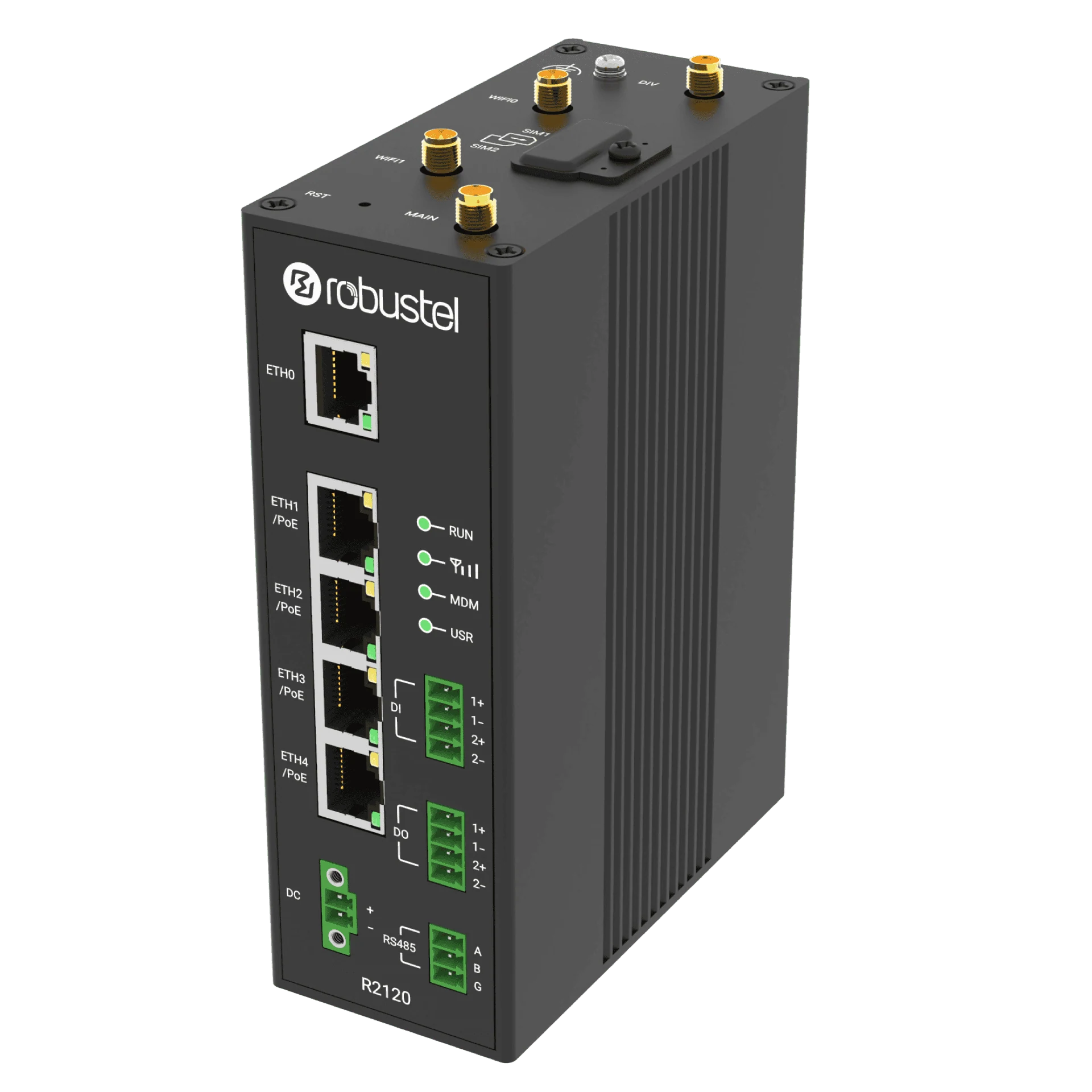


Product view R2120 front perspective
Product views · supplied accessories depend on the selected configuration.
R2120 Industrial 4G PoE PSE Router
Connect video surveillance, access-control and parking sites with four IEEE 802.3af/at PoE PSE outputs, five Gigabit Ethernet ports and dual-SIM 4G LTE. Power compatible IP cameras, door controllers or intercoms, with supported RCMS controls for remote PoE recovery.
- PoE power outputs
- 4 × PSE · ETH1–ETH4
- PoE standards
- IEEE 802.3af / at
- Per-port limit
- Up to 30 W at PSE
- Backhaul
- Dual-SIM 4G LTE
US$442 /unit
Shipping: US$40 per order worldwide.
Estimated delivery: 7–15 business days.
- Configuration
- Regional 4G · EMEA / Southeast Asia or ANZ
- Key approvals
- EMEA / Southeast Asia: CE · UKCA · CB; ANZ: RCM
Keep cameras connected. Keep access systems online.
Connect the site. Power the security endpoints.
Bring IP cameras and compatible PoE access-control terminals onto one regional 4G connection. Use the same approach for parking entrances, with the supply and PoE loads matched to the installation.
PoE IP cameras, ANPR cameras, door controllers and intercoms using IEEE 802.3af/at, within the verified power budget.
Optional: a compatible external PoE Wi-Fi access point.R2120ETH1–ETH4 source power and data. Five Gigabit Ethernet ports in total.
Provide the SIM/data service and verify the remote-management access required for the project.
Choose power for your installation.
The four PoE ports share the available system power. Size the supply for the router and the combined peak demand of your connected devices.
Only ETH1–ETH4 source PoE; the fifth Ethernet port is not a PSE output. Do not infer a 120 W total or assume 12 V input. Allow for router consumption, combined peak loads and system limits.
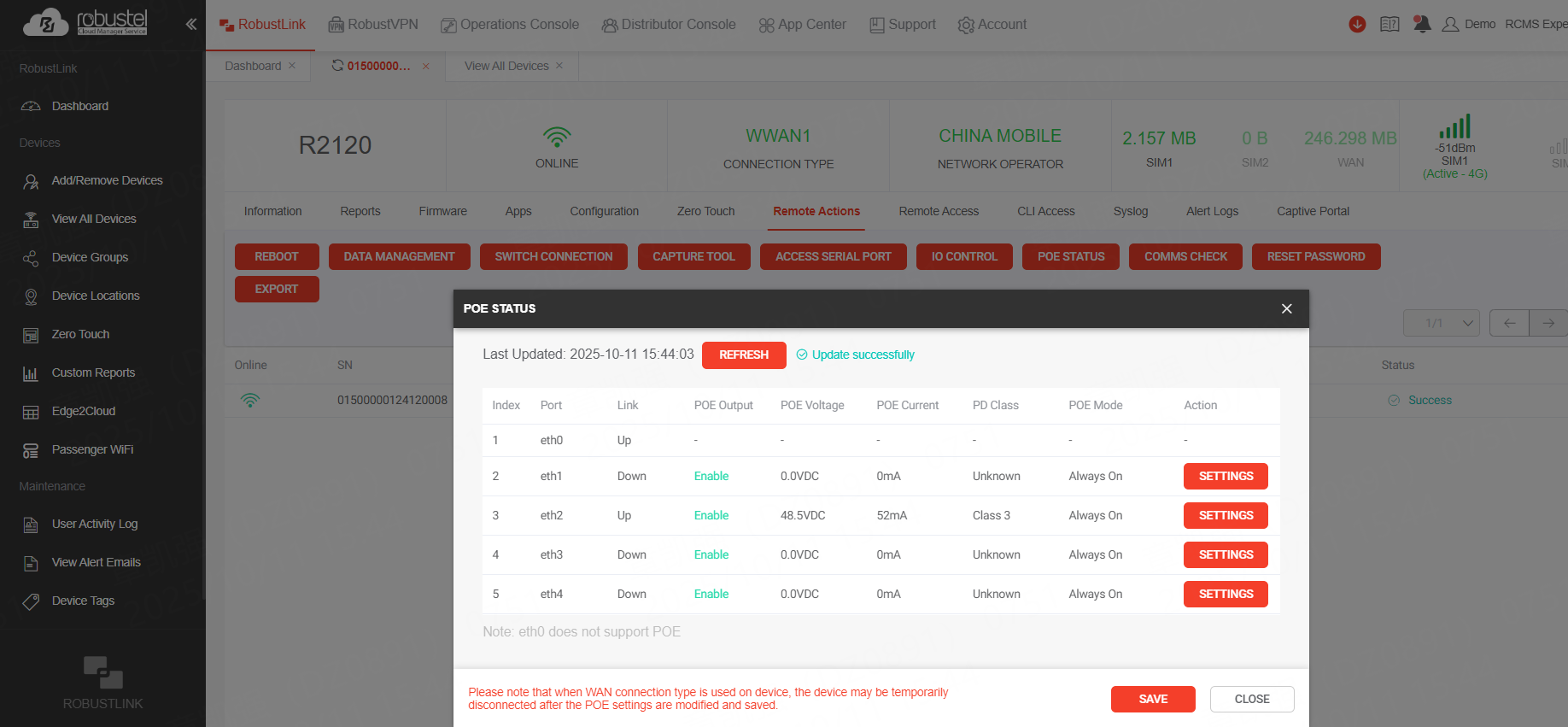
Switch PoE off and on to restart connected devices.
From RCMS, switch a selected PoE PSE output off, then back on, to power-cycle the connected camera or compatible PoE endpoint remotely. The router must remain online and the firmware, RCMS app and service must support port control.
- 01
Inspect the selected port
Check router connectivity, the intended endpoint and the reported PoE state.
- 02
Switch power off, then on
Disable the selected PoE output in RCMS, then restore it after the endpoint’s required shutdown interval. This interrupts downstream power, not just the data connection.
- 03
Verify the restart
Confirm that the endpoint boots and its video, network or application service returns. Coordinate access-control interruptions with site operations.
RCMS release notes document R2120 port monitoring and output-state/mode control with firmware v5.3.116 and RCMS App v5.2.3. Confirm the current compatible combination and service access; this is not a promise of automatic recovery while offline.
Technical specifications
Connectivity & management
| Parameter | Specification |
|---|---|
| Cellular | A12EU for EMEA / Southeast Asia or A13AU for ANZ; 4G with dual Mini SIM (2FF) |
| Ethernet | 5 × 10/100/1000 Mbps; 1 WAN + 4 LAN or 5 LAN |
| PoE PSE | ETH1–ETH4; IEEE 802.3af / 802.3at |
| Per-port PoE rating | Up to 30 W at each PSE port; shared total output depends on the system power budget |
| Serial & I/O | 1 × RS-485; 2 × DI + 2 × DO |
| Operating system | RobustOS; RCMS-compatible |
| Selected Wi-Fi | 802.11a/b/g/n/ac, 2×2; 2.4 GHz / 5 GHz |
Power & installation
| Parameter | Specification |
|---|---|
| DC input | 44–57 V DC |
| Total PoE budget | Shared budget depends on PSU capacity, router consumption and confirmed system limits |
| Recommended PSU reference | 48 V DC / 1.25 A (60 W) manufacturer reference; verify the quoted adapter and connected load |
| Operating temperature | −20 to +70 °C |
| Enclosure | IP30 aluminium; 49 × 105 × 143 mm |
| Mounting | Desktop, wall or 35 mm DIN rail; accessories depend on the selected pack |
| Router power reference | Up to 12 W at 48 V, excluding PoE consumption |
Specifications vary by model and hardware revision.
Recommended hardware configurations
Choose the model and regional configuration for your installation.
EMEA / Southeast Asia
- Manufacturer order reference
A015000004- Hardware model
- R2120-A5AAA-4L-A12EU
- Device reference
- B015000001
- Configuration
- 4G · EMEA / Southeast Asia
- Key approvals
- CE · UKCA · CB
Australia / New Zealand (ANZ)
- Manufacturer order reference
A015000005- Hardware model
- R2120-A5AAA-4L-A13AU
- Device reference
- B015000002
- Configuration
- 4G · Australia / New Zealand
- Key approvals
- RCM
Choose A015000004 for the EMEA / Southeast Asia radio variant or A015000005 for Australia / New Zealand. Both are accessory-pack references. The ANZ variant has RCM listed for Australia; confirm the current declaration, destination and mobile operator. The current table does not list a Global 4G R2120.
Included in this manufacturer pack
- 1 × R2120 router in the selected regional configuration
- 2 × cellular antennas
- 2 × Wi-Fi antennas
- 1 × power adapter; confirm the rating and destination plug.
- 1 × DIN rail mounting kit
Plan separately
- SIM card and mobile data service
- PoE cameras / access-control terminals, Ethernet cables and installation equipment
- RCMS plan / service term
Estimated delivery: 7–15 business days. Listed software is supplied with the hardware. Timing can vary with availability, destination and customs clearance. Worldwide outbound shipping is US$40 per order, charged once regardless of the number of items. Import charges are separate unless included or collected in your confirmed order.
Frequently asked questions
What devices can R2120 power over PoE?
Connect compatible IEEE 802.3af/at PoE cameras, door controllers, intercoms and external Wi-Fi access points. Locks and gate motors need their own power and control design. Passive-PoE, 802.3bt and higher-power devices are not automatically compatible; check their power requirements.
How do I choose a suitable power supply?
Use a suitable 44–57 V DC supply for PoE output. Size it for the router and the combined peak demand of connected devices, including startup loads. Up to 30 W per port does not mean all four ports can supply 30 W simultaneously.
Can I restart connected PoE devices remotely?
Yes. With compatible firmware, the RCMS app and service, switch a selected PoE port off and back on to restart its connected device. The router must remain online to receive the command.
Which regional model should I choose?
Choose A015000004 for EMEA / Southeast Asia or A015000005 for Australia / New Zealand. Check the selected model against the deployment country, local mobile operator and required radio bands. Regional approvals and network acceptance differ, so choose the configuration for the installation destination.
Can R2120 be installed outdoors?
R2120 has an IP30 enclosure and needs a suitable protected enclosure for outdoor installation. Check the temperature limits of the supplied model and allow for heat inside the cabinet. Use appropriate cable entries, weather protection and a suitable power installation.