
Summary
Key Takeaways
Billions of critical industrial devices still use reliable serial communication (RS232/RS485) and lack Ethernet ports.
An industrial cellular router with an integrated serial port is the most efficient all-in-one solution for bringing this legacy equipment online.
"Transparent Mode" (Serial-to-TCP) encapsulates serial data into IP packets, creating a "virtual serial cable" over the internet.
This technology allows you to use existing SCADA software to remotely access, poll, and program your serial devices as if you were plugged in locally.
I was on a factory tour recently, and the plant manager pointed to a 30-year-old CNC machine still running perfectly. "That machine," he said, "is the most reliable piece of equipment I own. But I have no idea what it's doing unless I walk over and look at its screen."
This is one of the biggest challenges in Industry 4.0. The factory floor is filled with billions of dollars worth of perfectly functional legacy equipment that was built to last for decades. The problem? It doesn't speak internet. It speaks a different language: serial communication, via RS232 or RS485 ports.
So, how do you bridge this gap? How do you get critical data from your most reliable machines into your modern monitoring systems? Let's be clear: you don't need a massive, expensive overhaul. You just need the right translator. This guide will show you how connecting serial devices over cellular is easier than you think.

The Challenge: Why Can't I Just Plug My PLC into the Internet?
Your modern computer uses an Ethernet port and the TCP/IP protocol to communicate. Serial devices use a different physical connection (like a 9-pin D-sub or a terminal block) and a different set of rules.
- RS232: Typically for one-to-one connections over short distances (e.g., a computer to a single device).
- RS485: A more robust standard for multi-drop networks, allowing you to connect up to 32 devices on a single bus over long distances (up to 4000 feet). This is the workhorse of the industrial world.
You can't just plug an RS485 device into an Ethernet port. The languages and physical connections are fundamentally different.
The Solution for Connecting Serial Devices over Cellular: The Router as a "Serial-to-IP" Gateway
For years, the solution was to buy a separate piece of hardware called a "serial device server" or "serial-to-Ethernet converter." You'd plug your PLC into this box, and then plug that box into a separate cellular router. It worked, but it was clunky, expensive, and added another point of failure.
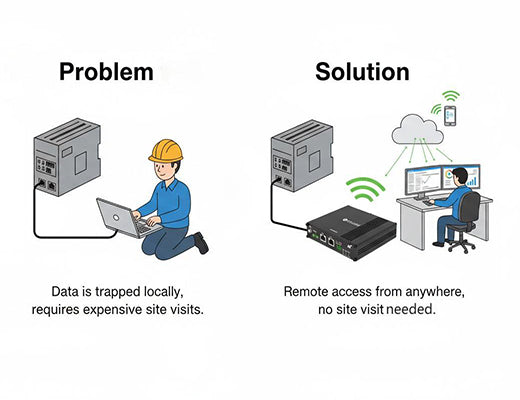
The modern, all-in-one solution is an industrial cellular router with an integrated serial port. This single device performs both jobs.
How It Works: "Transparent Mode" (Serial-to-TCP)
The most common and powerful method for connecting serial devices over cellular is called "Transparent Mode," also known as Serial-to-TCP. The real 'aha!' moment for engineers is realizing how simple this makes things.
- The Connection: You physically wire your PLC's RS485 port to the router's RS485 port.
- The Encapsulation: You configure the router to act as a TCP "server." When your SCADA software at the central office wants to talk to the PLC, it connects to the router's IP address on a specific port.
- The "Virtual Cable": The router then takes whatever data your SCADA software sends, wraps it inside a TCP/IP packet, and sends it over the secure cellular VPN to the router. The router unwraps the packet and sends the raw serial data out of its RS485 port to the PLC.
- The Response: The PLC's response is captured by the router's serial port, re-wrapped into a TCP/IP packet, and sent back.
From your software's perspective, it's as if there is a direct, uninterrupted serial cable stretching hundreds of miles from your server to the PLC.

Why This is a Game-Changer for Legacy Equipment
This all-in-one approach unlocks tremendous value:
- Reduced Cost & Complexity: You only need to buy and install one device, not two. This saves on hardware costs, cabinet space, and power consumption.
- Remote Programming & Troubleshooting: You can use your existing PLC programming software (like Siemens TIA Portal or Rockwell's Studio 5000) to remotely connect to, troubleshoot, and even update the logic on your legacy machines.
- Preserve Existing Investments: You don't have to replace your reliable, multi-million dollar legacy equipment. You can bring it into your modern IIoT ecosystem for the cost of a single industrial router.

Conclusion: Bridge Your Past to Your Future
Don't let legacy protocols leave your most valuable assets stranded on data islands. Connecting serial devices over cellular using an integrated industrial router is a proven, cost-effective, and highly reliable strategy. It's the essential bridge that allows your time-tested operational technology to speak the language of the modern, data-driven world.
Learn More in our main guide:
Frequently Asked Questions (FAQ)
Q1: What is the difference between RS232 and RS485?
A1: The main differences are distance and the number of devices. RS232 is for short-distance (typically <50 feet), point-to-point communication between two devices. RS485 is a much more robust industrial standard that allows for long distances (up to 4000 feet) and connecting multiple devices (up to 32) on a single pair of wires.
Q2: What is a "virtual COM port"?
A2: Some software is designed to only communicate with a physical COM port on a computer. Virtual COM port software is a utility you can install on your PC that creates a "virtual" software-based port. You can then link this virtual port to the IP address and port of your remote router. This "tricks" the legacy software into thinking it's connected to a local device, when in fact it's communicating over the internet.
Q3: Can the router also convert Modbus RTU (serial) to Modbus TCP (IP)?
A3: Yes, this is another key function. Many industrial routers have a built-in Modbus gateway feature that can perform this protocol conversion directly on the device. This allows modern Modbus TCP masters to poll legacy Modbus RTU slave devices without needing any other conversion hardware.


Comments
Leave a comment